
Using it well, and where it falls short
Auto Focus Keyword is a productivity tool, not a replacement for keyword research. This page covers where the automation does not produce a good result, and what to do about it.
When the page title is a poor keyword
The plugin writes the WordPress post title into the focus keyword field. That assumption holds well on:
- product catalogues, where the product name is almost always the search target;
- service pages with descriptive names;
- articles with search-oriented titles.
It holds less well when:
- titles carry branding, such as
Premium Consulting Services | Acme Corp; - titles are creative or abstract rather than descriptive;
- the real target is a long-tail phrase that never appears in the title;
- a page legitimately targets more than one phrase.
Why this matters downstream
A weak focus keyword does not stay contained. Automatic Internal Links uses it as anchor text, so a poor target produces a poor anchor everywhere on the site at once.
That is the strongest argument for the review step. It is not polish; it protects both layers.
Which pages to exclude, and how
Decide your exclusions before filling anything. Two mechanisms exist.
Black List Post(s). In the Settings panel, select specific pages, posts or products to exclude from FETCH entirely. They never reach the waiting list, even with an empty field.
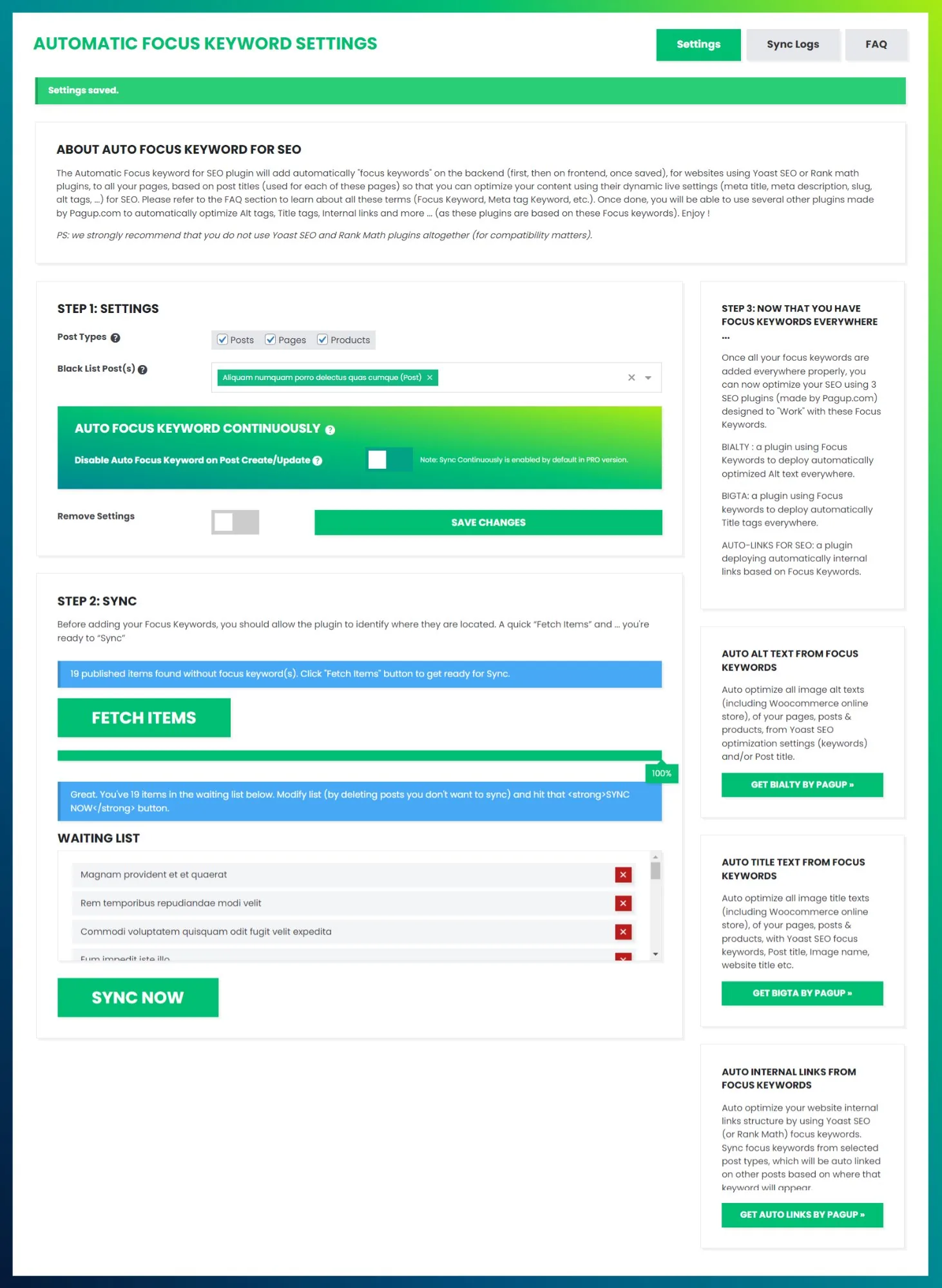
Per-content metabox (Pro). A metabox in the editor sidebar excludes a single page as you work, which suits one-off decisions better than maintaining a list.
Typical candidates: the homepage, which usually targets a brand rather than a phrase; contact and legal pages, which exist for users and compliance; landing pages built around a chosen phrase you do not want overwritten; and any page whose title simply does not reflect the SEO target.
A realistic goal is not "zero empty fields". It is "every page that should have a target has one".
The hybrid strategy
The approach that actually works, in order:
- Bulk populate. Run FETCH then SYNC across the site to fill every empty field.
- Prioritise review. Adjust the keywords of your top pages by traffic, conversion or strategic weight. This is where judgement adds the most, because you are choosing a target rather than recording one.
- Maintain automatically. Enable continuous assignment for ongoing content, then review new entries periodically.
Breadth from automation, judgement where it counts.
For WooCommerce stores
Product titles are almost always the right target. Run it on the whole catalogue without hesitation, and spend your review budget on category pages and editorial content instead.
For content-heavy blogs
Blog titles are often, but not always, search-oriented. After the bulk pass, sort the Sync Logs by date and review the most recent entries. Older posts with low traffic can keep the automatic value; the cost of a mediocre keyword there is close to zero.
Read next
- How it works — detection, the query, and scope
- Fetch and sync — running it and keeping it populated
- No focus keyword set — the problem, and when to ignore it
- Anchor text guide — what a weak keyword does to your anchors