
 Auto Focus Keyword for SEO
Try the workflow on a fictional site →
If your SEO plugin keeps telling you that no focus keyword has been set, and you have hundreds of pages in that state, filling the field by hand is not a realistic plan. Auto Focus Keyword for SEO finds every published page whose focus keyword field is empty and populates it from the page title, in bulk.
It is free on WordPress.org, with over 2,000 active installs.
Looking for something else?
- What a focus keyword is, with examples → What are focus keywords?
- Your SEO plugin says no focus keyword is set → No focus keyword set
- Turning those keywords into internal links → Automatic Internal Links
This page is about the plugin that fills the field in bulk.
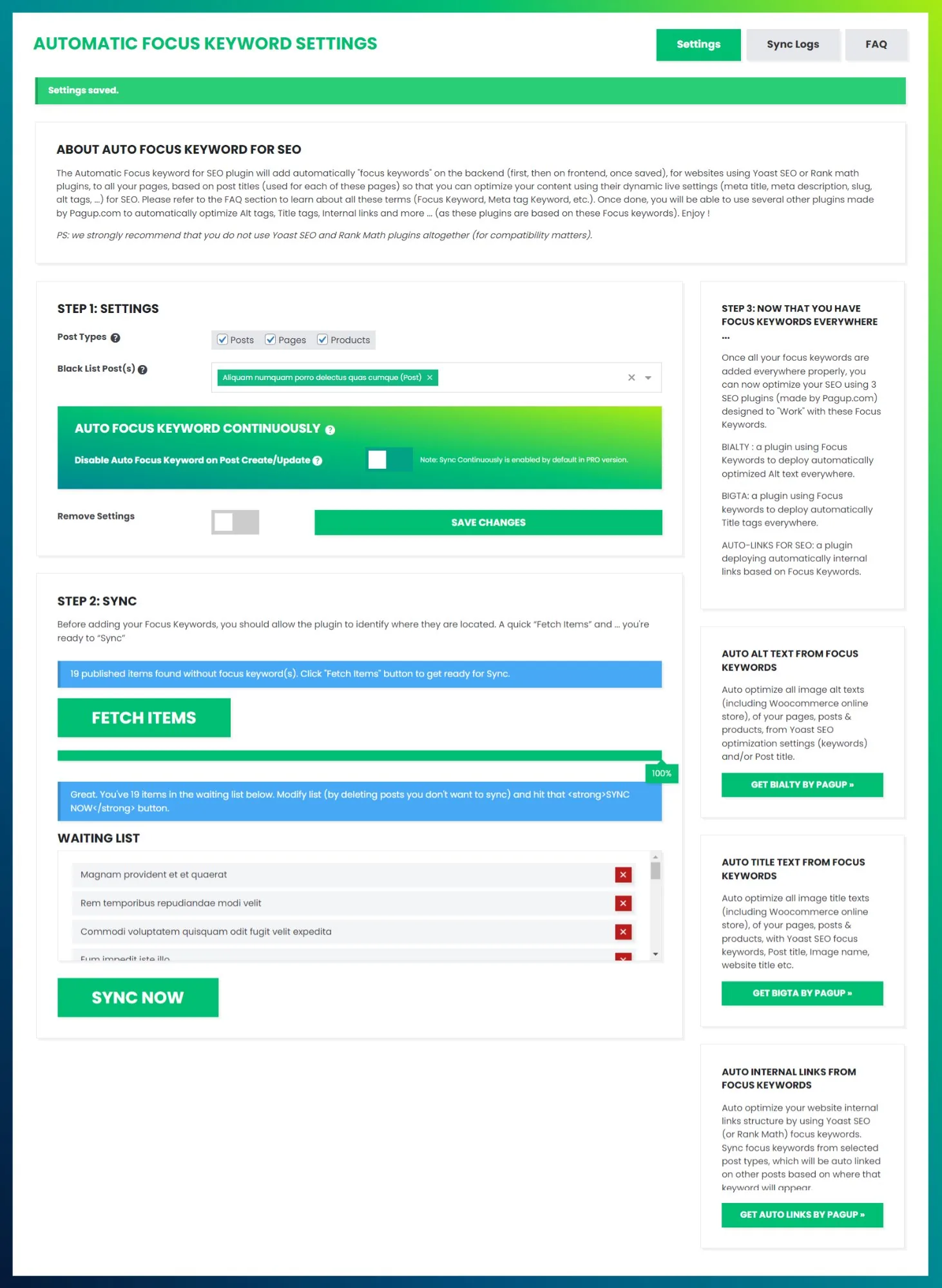
Bulk filling with Auto Focus Keyword
Yoast SEO, Rank Math, All in One SEO and SEOPress all keep a focus keyword field on every post, page and product. The field is where you record the phrase a page is meant to be relevant for. Most sites fill it for a while, then stop.
The consequences are ordinary but real:
- The plugin's own analysis has nothing to work with, so its indicators stay grey or red across most of the site.
- Anyone auditing the site cannot tell which pages have a deliberate target and which were never reviewed.
- Any tool that reads focus keywords, including Automatic Internal Links, has nothing to read.
The field being empty is not itself a ranking penalty. It is a missing operational layer, and everything built on top of that layer is missing with it.
How it works: FETCH, then SYNC
The workflow has two steps and no configuration to speak of.
FETCH runs a database query across your published content, keeps only the rows where the focus keyword meta key is missing or empty, drops anything you have blacklisted, and shows you how many items it found. Nothing is written at this stage.
SYNC takes each item from that waiting list and writes the page title into the focus keyword field of your active SEO plugin. You can remove items from the waiting list before you run it.
Large sites are processed in batches so the request does not time out. You do not configure the batch size; the plugin paginates on its own. Keep the page open while SYNC runs, because closing it cancels the process. Everything written appears in the activity log.
Which SEO plugin it writes to
The plugin detects which SEO plugin is active and writes to that plugin's own storage:
| SEO plugin | Where the keyword is written |
|---|---|
| Yoast SEO | _yoast_wpseo_focuskw post meta |
| Rank Math | rank_math_focus_keyword post meta |
| All in One SEO | aioseo_posts table, keyphrases JSON |
| SEOPress | SEOPress target keyword post meta |
If none of these is active, the plugin cannot operate and says so rather than writing anywhere.
Running two SEO plugins that both own focus keyword data at the same time is not recommended, for compatibility and for editorial clarity. Pick one. Full compatibility notes →
What it will not do
This matters more than the feature list, because it is where automated keyword tools usually overpromise.
- It does not do keyword research. It does not look at search volume, difficulty or competition. It copies the title you already wrote.
- It never overwrites an existing focus keyword. Only empty fields are touched, so a keyword you set by hand is safe.
- It does not change anything your visitors see. The focus keyword is a backend field.
- It only touches published content. Drafts and pending posts are left alone.
Page title is not always the ideal keyword
The shortcut works well when the title already describes what the page is about: product names, service pages with descriptive names, articles with search-oriented titles.
It works less well when titles carry branding ("Premium Consulting Services | Acme Corp"), when they are creative rather than descriptive, or when the real target is a long-tail phrase that does not appear in the title.
The honest way to use this plugin is as a starting point: run FETCH and SYNC to populate everything, then revisit your most important pages and refine those by hand. Broad coverage from automation, judgement where it counts. Limitations in detail →
This matters downstream too. A weak focus keyword produces weak anchor text when Automatic Internal Links consumes it, so the review step protects both layers.
Which content it covers
| Content type | Free | Pro |
|---|---|---|
| Posts | ✓ | ✓ |
| Pages | ✓ | ✓ |
| WooCommerce products | — | ✓ |
| Custom post types | — | ✓ |
| Continuous sync on create and update | — | ✓ |
| Per-page exclusion metabox | — | ✓ |
Posts and pages are selected by default. For a WooCommerce catalogue the product name is almost always the right target, which is where the Pro coverage earns its place. Post type selection →
Keeping pages out of it
Some pages should keep a hand-picked keyword, or none at all: the homepage, contact and legal pages, and landing pages built around a specific phrase.
The Black List Post(s) setting excludes chosen items from FETCH entirely, so they never reach the waiting list. Pro adds a metabox in the editor sidebar for excluding a single page as you work. Exclusions →
Staying populated as you publish
Backfilling once solves today's problem. New content recreates it.
The Pro option Auto Focus Keyword Continuously hooks into the WordPress publish and update lifecycle and fills the field whenever content is saved without one. It is the right setting for a site with steady output and editors who do not reliably fill the field. It is the wrong setting for a team that researches keywords deliberately, because it will get ahead of them on new posts. Auto Sync →
Why this is step one
A populated keyword layer is worth something on its own, but it is worth more as an input. Once every page carries a focus keyword, Automatic Internal Links can read that layer and build internal links using those keywords as anchors, across the whole site rather than the handful of pages you got to by hand.
That sequence is the point of the pipeline: assign first, link second.
Common questions
Will this improve my rankings by itself? No. Filling a metadata field is not a ranking action. What it does is make the keyword layer complete, so that audits, plugin analysis and internal linking can all operate site-wide.
Will it overwrite the keywords I set myself? No. Only empty fields are populated.
What if I use more than one SEO plugin? The plugin writes to the one it detects as active. Running two plugins that both own focus keyword data is not recommended regardless of this plugin.
Does it work on a large site? Yes. Content is processed in batches specifically so that sites with thousands of items do not time out.
Is the free version time-limited? No. Posts and pages are covered in the free version on WordPress.org. Pro adds WooCommerce products, custom post types, continuous sync and the per-page metabox.
Get started
Get Auto Focus Keyword Pro · Start 7-day paid trial
Read next
- Overview: how the plugin detects Yoast, Rank Math, AIOSEO or SEOPress
- Fetch & Sync: the core workflow, step by step
- Limitations: when page title is not the ideal keyword
- Best Practices: the hybrid automatic and manual strategy
- What are focus keywords?: the concept explained, before automating it
- Pipeline / Step 1: how this fits the broader system